Live Decision Context
Poker-Eye reads the current hand, your hole cards, position, and supported table state. When available, it also factors in prior hands, VPIP/PFR, action timing, and observed tendencies.
 AAPoker Compatible Workflow
Use Poker-Eye with supported AAPoker tables for NLH, NLHB, NLHRP, NLHRPB, NLHSQ, and NLHSQB. Open AAPoker and join each table manually, then use guidance mode for visible action cues or automatic mode for supported action clicks. Each table uses a separate Poker-Eye account and status indicator. AAPoker Bot refers to the automatic mode of the same Poker-Eye application, not a separate download.

Four steps take you from a compatible installation to a controlled AAPoker session.
Download the current APK and install Poker-Eye on a compatible Android phone running Android 9 or later, in a tested LDPlayer setup on Windows, or in MuMuPlayer for Mac on an Apple Silicon Mac. Then enter the Agent Code supplied by your agent or seller.
Launch AAPoker and take a seat manually at a supported table. Poker-Eye does not choose a room, open a table, or take a seat for you.
Use guidance mode to follow the configurable action cue and act manually, or use automatic mode in the same Poker-Eye application to click the corresponding supported AAPoker action.
Use a separate Poker-Eye account for each table, then use its status control to check readiness, change modes, pause Poker-Eye, or stop it and take over manually.
Each capability connects a confirmed Poker-Eye input or control with the result visible on an AAPoker table.
Poker-Eye reads the current hand, your hole cards, position, and supported table state. When available, it also factors in prior hands, VPIP/PFR, action timing, and observed tendencies.
A Raise, Bet, Call, Check, or Fold cue appears over the room interface. You can adjust its size, color, and screen position.
The same Poker-Eye decision engine can click the corresponding supported in-game action. Opening the poker room and joining a table remain manual.
Each active table uses a separate Poker-Eye account and status indicator. The practical number of tables depends on your computer, emulator configuration, and available resources.
Use Poker-Eye only with the confirmed AAPoker formats below, and verify the current setup before the session.
The icon and message appear together, so you can identify each table's status without relying on color alone.

A green check means Poker-Eye is ready to work with the current AAPoker table.

Gray signal bars mean the connection, IP, or geolocation needs to be checked before automatic mode continues.

An orange warning means the available Fuel or current operating state needs attention.

A red cross means the selected game is outside the confirmed AAPoker formats. Choose NLH, NLHB, NLHRP, NLHRPB, NLHSQ, NLHSQB.
Confirm the application, device or emulator environment, and activation method before opening an AAPoker table.
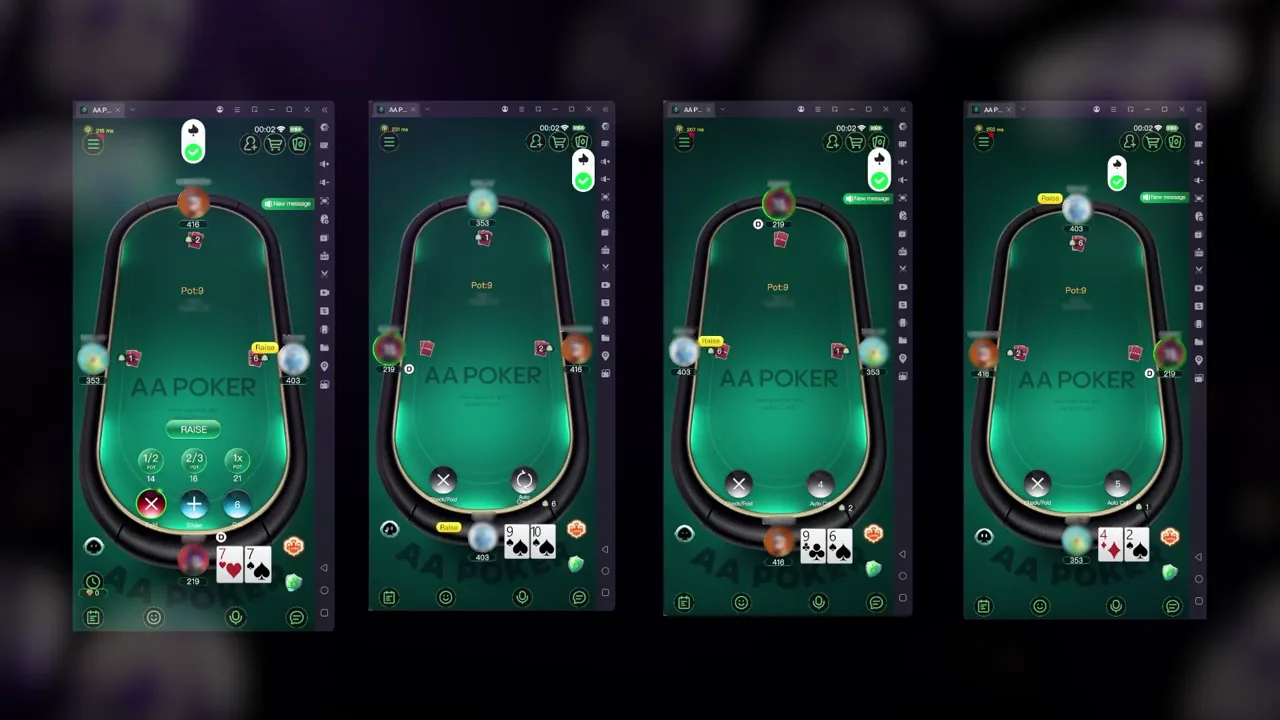
Watch a full AAPoker session with four tables open and a separate Poker-Eye account for each table. The recording shows table-specific status indicators, action cues, and native controls.
The recording demonstrates product behavior only. It is not a claim about profit, win rate, account safety, or permitted use in every room or club.
Fuel is used per hand or round, and the rate depends on the room and game type. Ask the Poker-Eye sales team for the current AAPoker rate before starting. Your first trial includes 100 Fuel. Arrange it through Sales or the landing-page chat.
Message the Poker-Eye sales team directly for current rates, trial access, setup, and product questions. Response times vary.
The confirmed AAPoker formats are NLH, NLHB, NLHRP, NLHRPB, NLHSQ, and NLHSQB.
No. AAPoker Bot is the automatic mode of the same Poker-Eye application. The application also includes guidance mode for visible action cues.
Yes. In guidance mode, Poker-Eye displays a configurable action cue over the AAPoker interface, and you complete the action manually.
Install and activate Poker-Eye, open AAPoker, join a supported table manually, and then select guidance or automatic mode.
Each Poker-Eye account works with one table. To run several AAPoker tables at once, use a separate account for each table. The practical number depends on your computer, emulator configuration, and available resources.
Use Android 9 or later on a compatible Android phone, a tested LDPlayer setup on Windows, or MuMuPlayer for Mac on an Apple Silicon Mac.
Fuel is consumed per hand or round. The rate varies by room and game type, so ask the Poker-Eye sales team for the current value.
Download Poker-Eye, activate it with your Agent Code, and confirm the AAPoker format and setup before joining a table.
18+. Poker involves financial risk. Check current AAPoker rules and local requirements. Poker-Eye does not guarantee results or account safety.