
Poker-Eye — AI-Powered Poker Assistant
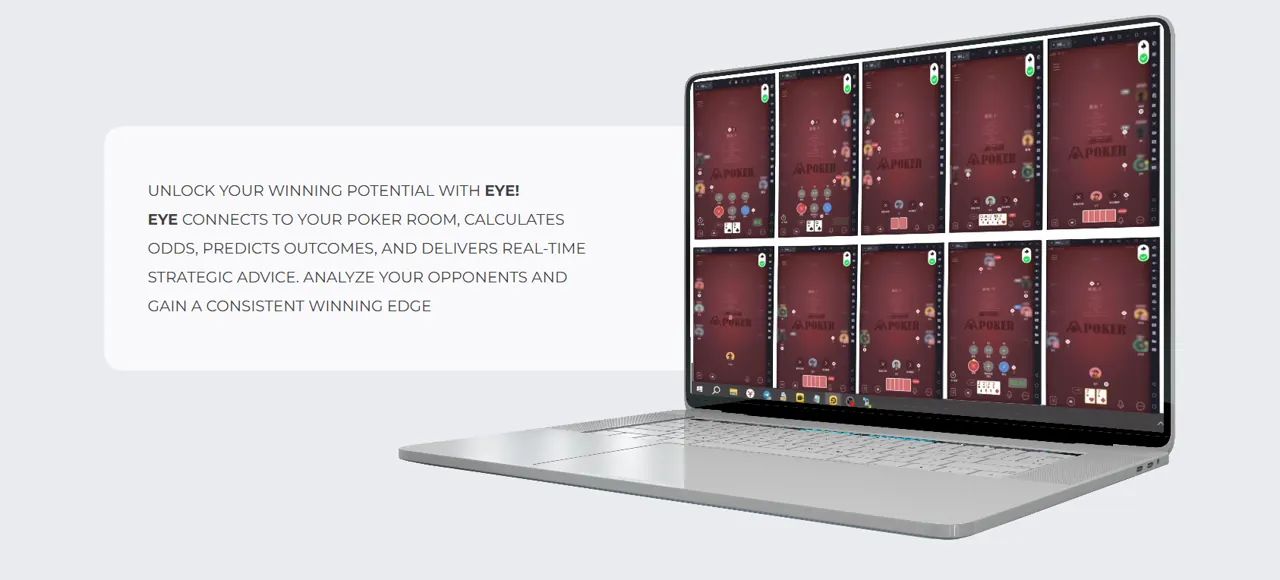
Use the Poker-Eye assistant with a supported room to calculate odds, analyze each decision, and receive real-time strategic guidance in one mobile interface.
View Supported Platforms

- AOF
- NLH
- NLHB
- PLO
- PLO5
- PLO5B
- PLO6
- PLO6B
- PLOB
- NLHSQ
- NLHSQB
- NLH Zoom
- NLHRP
- NLHRPB
Two Ways to Use Poker-Eye
Follow real-time action cues yourself or let Poker-Eye automate supported in-game actions.
Poker Bot
Let Poker-Eye click supported in-game actions after you open the room and join a table manually. A multi-table setup uses a separate Poker-Eye account for each table.
- Automatic action clicks
- One account per table
- Pause and stop control

Poker AI
Use live table context, opponent history, VPIP/PFR, action timing, cards, and position to generate an on-table action cue.
- Live table analysis
- Opponent context
- Customizable action cues
How Poker-Eye Works as an AI Poker Assistant
After you open a supported room and join a table, Poker-Eye reads the current hand, your cards, position, and table situation. When available, it also uses previous encounters with an opponent, VPIP/PFR, current action timing, and observed table behavior.
The result appears as a configurable action cue over the room interface. You can follow the cue in guidance mode or use automatic mode, which clicks the supported in-game action. The on-table control lets you change modes, pause or stop Poker-Eye, and check its current status.
Supported Platforms
Review every supported room below. Published format combinations appear on the relevant room cards; check the current Android, LDPlayer, or MuMuPlayer setup before you start.

PPPoker
AOF, NLH, NLHB, PLO, PLO5, PLO5B, PLO6, PLO6B, PLOB

WePoker
WePoker: NLH, NLHB, NLHSQ, NLHSQB, PLO, PLO5, PLO5B, PLOB; WePoker Lobby: NLH, NLH Zoom, NLHB, NLHSQ

HHPoker
AOF, NLH, PLO, PLO5
AAPoker
NLH, NLHB, NLHRP, NLHRPB, NLHSQ, NLHSQB

RedDragon
NLH, NLHB, NLHSQ, NLHSQB, PLO, PLO5, PLO5B, PLOB

WPT Global
NLH, NLH Zoom, NLHB, NLHSQ

XPoker
AOF, NLH, NLHB, NLHSQ, NLHSQB, PLO, PLO5, PLO5B, PLO6, PLO6B, PLOB

PokerWorld

DePuZhiXing
NLH

PokerBROS
AOF, NLH, NLHB, PLO, PLOB, PLO5, PLO5B, PLO6, PLO6B
Poker-Eye Assistant Capabilities
Every capability connects a visible action with a practical result.
Live Decision Context
Use the hand, position, opponent history, VPIP/PFR, action timing, and current table behavior to evaluate the next action.
Configurable Action Cues
Show the recommended action over the room interface and adjust the cue’s size, color, and screen position.
Guidance or Automation
Follow the cue manually or let Poker-Eye click the corresponding supported in-game action.
Direct Sales Contact
Message the Poker-Eye sales team directly for current rates, trial access, setup, and product questions. Response times vary.
Start in Three Steps
Download
Get Poker-Eye for a compatible Android phone running Android 9, a tested LDPlayer setup on Windows, or MuMuPlayer for Mac on an Apple Silicon Mac.
Open DownloadInstall
Install the APK, enter your Agent Code, and follow the current Windows or macOS emulator tutorial.
Watch TutorialsJoin a Table
Open a supported room and take a seat manually, then choose guidance or automatic mode.
See How It Works
Results Available Through the Admin Panel
Agents and large partners can review hands, limits, and profit context in the Admin Panel. Retail users can request their available statistics through their agent. The product-supplied WePokerClub chart shows approximately 280,000 hands and 120,000 big blinds in profit, equivalent to more than 40 bb/100 over the displayed sample. These figures have not been independently verified and do not guarantee future performance.

Sales and Learning Resources
Use the tutorials, official channel, and FAQ for self-service information. For current rates, trial access, setup, or product questions, message the Poker-Eye sales team directly. Response times vary.
Direct Telegram contact for rates, trial access, setup, and product questions. Response times vary.
Message SalesPartnership
Introduce Poker-Eye to your audience and discuss current partnership terms directly with the team.
FAQ
What Is Poker-Eye?+
Poker-Eye is one application with guidance and automatic modes. The shared decision engine can show a live action cue or click the corresponding supported in-game action.
Which Poker Platforms Are Supported?+
Current support includes AAPoker, RedDragon, WePoker, PPPoker, WPT Global, HHPoker, XPoker, PokerBROS, PokerWorld, and DePuZhiXing. Published format details are listed in the platform section.
What Is the Difference Between Poker Bot and Poker AI?+
They are two modes of the same Poker-Eye application, not separate products. Poker AI explains the shared decision engine and action cue; Poker Bot explains optional automatic action clicks.
How Does Poker-Eye Work as a Poker Helper?+
It reads the current hand, your cards, and position, plus available opponent history, VPIP/PFR, action timing, and table behavior. The result appears as an on-table action cue.
What Setup Is Supported?+
Use Android 9 or later on a compatible Android phone, a tested LDPlayer setup on Windows, or MuMuPlayer for Mac on an Apple Silicon Mac. MuMuPlayer runs on a Mac; it does not add iPhone or iOS support.
Does Poker-Eye Guarantee Results?+
No. Poker outcomes involve variance and financial risk, and no software can guarantee winnings, account safety, or a specific result.
Get Real-Time Guidance in One Mobile Interface
Check a supported platform, download the app, and follow the current setup.