
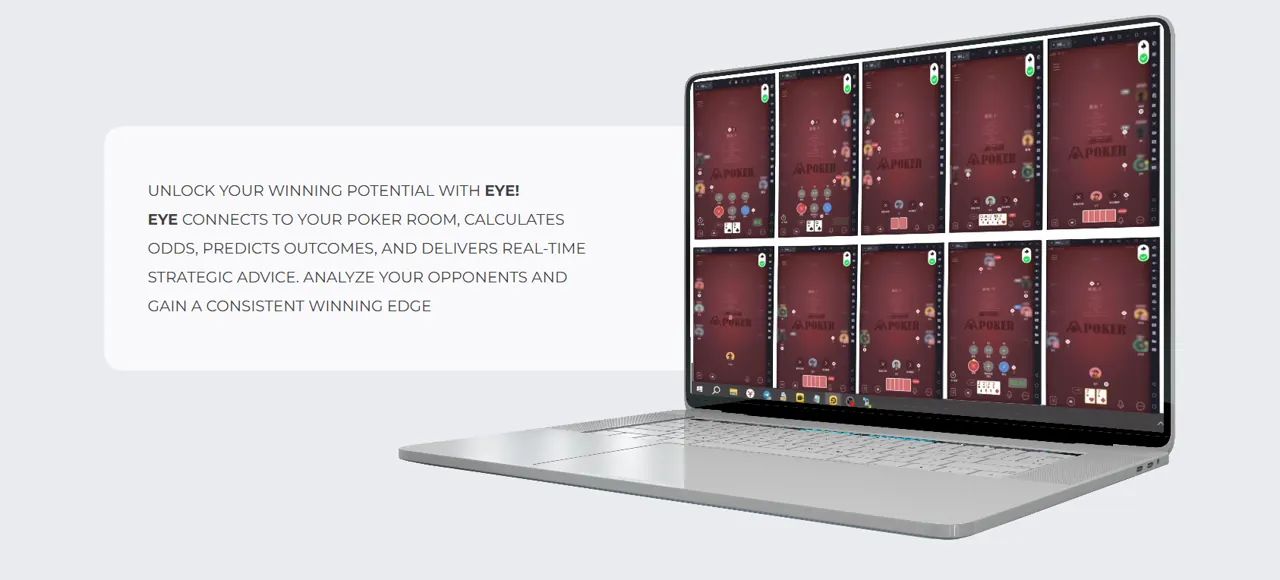
Guidance Mode
Poker-Eye displays the recommended action while you remain responsible for clicking the poker room controls.
Explore Poker AIPoker-Eye reads the live state of a supported poker table, evaluates the current hand and available opponent context, then displays a configurable action cue. Follow the cue yourself or use automatic mode for supported in-game actions.
Check Compatibility
One Poker-Eye application supports guidance and automatic actions. You choose the mode and keep control of the table.
Install Poker-Eye and enter the Agent Code supplied by your agent or seller.
Open a supported poker room and take your seat manually.
Poker-Eye reads the table, hand, position, and available player context.
A configurable cue shows the recommended action over the table.
Follow the cue yourself or let automatic mode click a supported action.
The demo shows the same application moving from a live table read to an action cue and a supported action.
Download AppThe decision engine combines the current hand with the table data available at that moment.
Available inputs can differ by room, format, and table. The action cue reflects the context Poker-Eye can read in the active session.

Poker-Eye displays the recommended action while you remain responsible for clicking the poker room controls.
Explore Poker AIPoker-Eye uses the same decision engine, then clicks the corresponding supported action. You still open the room, join the table, and control whether automatic mode is active.
Explore Poker BotPoker AI explains the decision engine and guidance mode. Poker Bot explains the optional automatic mode in the same Poker-Eye application.

The indicator belongs to the active table window. Its icon and message show whether Poker-Eye is ready or needs attention.

A green check means Poker-Eye is ready on the current table.

Gray signal bars indicate a connection issue. Check the device connection, IP, and geolocation. Until the status is restored, continue manually or leave the table.

An orange exclamation mark means the balance or current operating state needs attention. Check the available Fuel and contact the sales team if the warning remains.

A red cross means the selected game type is not supported. Leave the table and choose a supported room and format.
The list below includes every currently supported room. Published game formats appear where the room-format combination has been confirmed.
 PPPokerAOF, NLH, NLHB, PLO, PLO5, PLO5B, PLO6, PLO6B, PLOB
 WePokerWePoker: NLH, NLHB, NLHSQ, NLHSQB, PLO, PLO5, PLO5B, PLOB; WePoker Lobby: NLH, NLH Zoom, NLHB, NLHSQ
 HHPokerAOF, NLH, PLO, PLO5
 AAPokerNLH, NLHB, NLHRP, NLHRPB, NLHSQ, NLHSQB
 RedDragonNLH, NLHB, NLHSQ, NLHSQB, PLO, PLO5, PLO5B, PLOB
 WPT GlobalNLH, NLH Zoom, NLHB, NLHSQ
 XPokerAOF, NLH, NLHB, PLO, PLO5, PLO5B, PLO6, PLO6B, PLOB
 PokerWorld
 DePuZhiXingNLH
Use a compatible Android phone running Android 9 or later.
Use a tested LDPlayer setup. LDPlayer 9 requires an x86/x86_64 Intel or AMD CPU, 2 GB RAM, 36 GB of free storage, DirectX 11 or OpenGL 2.0, and enabled VT-x or AMD-V.
Use MuMuPlayer for Mac on an Apple Silicon Mac and install the current APK inside the emulator.
Fuel is used per hand or round. Consumption depends on the room and game type, so ask the Poker-Eye sales team for the current rate before starting. The first trial includes 100 Fuel and is arranged through Sales or the landing-page chat.
Message the Poker-Eye sales team directly for current rates, trial access, setup, and product questions. Response times vary.
Direct Telegram contact for rates, trial access, setup, and product questions.
No. You open the supported poker room and take a seat manually. Poker-Eye starts working with the active table after the setup and table state are available.
Guidance mode shows the action cue for you to follow. Automatic mode uses the same decision engine and clicks the corresponding supported in-game action.
Yes. The on-table control lets you switch modes, pause the application, or stop it and take over manually.
The table indicator shows a connection issue. Take over manually or leave the table while you check the device connection, IP, and geolocation. Poker-Eye does not promise automatic reconnection.
Each Poker-Eye account works with one table. To run several tables simultaneously, use a separate account for each table. The practical number depends on the computer, emulator configuration, and available system resources.
Use MuMuPlayer for Mac on an Apple Silicon Mac. MuMuPlayer runs on a Mac; it does not add iPhone or iOS support.
Download the current Poker-Eye APK, confirm your room and format, and use the setup tutorial before joining a table.